Why this guidance note is relevant to you
For an organiser, understanding the full range of functionalities and features this system offers is crucial for the successful execution of your initiative. This resource outlines how to set up and customise your collection platform, ensuring it aligns with your campaign's visual identity and goals. It also details the process for integrating this system with your campaign site, managing supporter communications, and adhering to security and accessibility standards.
With this guidance note, you can learn to efficiently manage your initiative from initial setup to the end of the signature collection period, ultimately helping you reach the required one million signatures across at least seven Member States.
Overview
The goal of a European Citizens’ Initiative is to reach at least 1 million signatures, including a minimum number in at least seven Member States, in 12 months. As an organiser, you will have 6 months from the date of registration of your initiative to decide when to begin the one-year collection of statements of support – both online or using paper forms.
Signatories need to be EU citizens (nationals of EU Member States) and old enough to vote in the elections for the European Parliament in their Member State – unless that Member State has set the minimum age for signing a European Citizens’ Initiative at lower age and has informed the Commission accordingly. See the list of age requirements.
The Central Online Collection System is the sole online collection system for the European citizens' initiatives registered after 1 January 2023.
The Central Online Collection System
The Central Online Collection System is composed of two parts:
a) The public interface where citizens can discover and support initiatives.
b) The organiser interface, which is a management dashboard where organisers can customise their online collection system and communicate with supporters.
To find out more information about the administration part, please refer to the User Manual: European Citizens' Initiative - Organiser account for initiatives using the Central Online Collection System (accessible for organisers).
Main features of the online collection system:
- Minimum preparation (turnkey solution) and free of charge;
- No approvals or certifications required: the system already complies with technical and security standards
- to use the system, you just sign an agreement with the Commission;
- Quick setup: to use the system, simply inform the Commission 10 working days before starting the collection, via your organiser account;
- Guarantees a high level of security, complying with the Decision[1] on the security of communication and information systems in the European Commission;
- The system is fully accessible for people with disabilities
- Regularly undergoing tests for vulnerability, performance, usability and accessibility;
- Gives organisers possibility to send emails to supporters;
- Fully integrated with the ECI organiser account;
- Fully integrated with the File Exchange Service (for transfer of statements of support to Member States for their verification in case of successful initiatives);
- Continuously evolving by gathering input from stakeholders.
[1] Commission Decision (EU, Euratom) 2017/46 of 10 January 2017 on the security of communication and information systems in the European Commission, OJ L 6, 11.1.2017, p. 40.
Structure of the online collection system
The left side of the website is designed to display:
- The initiative logo;
- Main objectives of the proposed initiative;
- The link to the webpage of the initiative in the Commission's register.

Additional information on this panel includes the initiative’s website, the organisers’ contact details, the registration number, the start date of the collection period, and links to the initiative’s social media channels.
The progress bar at the bottom of the left side of the website shows the public the progress of the signatures collected by the initiative.

Below the progress bar, it is explained that for an initiative to be valid, it must gather at least one million valid signatures and meet the minimum thresholds in at least seven countries.
On the right side of the webpage, you can support the European citizens’ initiative in one of two ways:
- Sign with your eID – if your country of nationality offers this option.
- Fill in the online form – available for all EU citizens.
The deadline for adding a signature is displayed on the right side. Information about the personal data required for signing an initiative, along with the privacy statement, is shown before the citizen has the option to proceed.
Each form is customised according to the data required by the Member State selected (including the option of using the eID).
The navigation is at the top of the page, and it leads back to the initiatives page or the homepage of the ECI website.
What citizens experience when signing online
Depending on their nationality, citizens can support an initiative either:
- via their country's eID system;
- or through an online form (see data requirements for each Member State).
If they choose to sign via eID, they are redirected to their national eID portal to complete the authentication process before their support is recorded.
When using the online form, once the country has been selected, the relevant form is displayed on the same page. Each form is customised to reflect the specific data required in the selected country.
The citizen signing the initiative can change the language of the interface at any time using a drop-down list on the top right of the page. The language of the initiative information will change accordingly.
After citizens successfully support an initiative, they are automatically sent to a signature confirmation page. On this page, the citizen is provided with a signature identifier.

It is recommended that citizens download this signature identifier for their reference.
The citizen is informed about the next steps: what happens if the initiative obtains at least one million signatures, the verification process, and the Commission's reply. Step-by-step information can be found, for more information, on the linked ECI website.
The citizen also has the option to subscribe to updates by providing their email address on the following:
- Updates about the European Citizens' Initiative signed (your initiative's mailings)
- European Commission’s monthly newsletter on European citizens’ initiatives
Additionally, at the bottom of the page, citizens can opt to share the initiative on social media and provide feedback. In that case, they need to give consent to the applicable privacy statement(s) and the processing of their personal data.
The footer includes links to share the initiative on social media and to the European Citizens' Initiative website, where users can explore and support other initiatives.
Ways to customise your online collection platform
You, as an organiser, have the possibility to customise some parts of their signature collection page. These are the ways in which you can customise:
- Upload of own initiative logo;
- Link to own website of the initiative;
- Display of social media links under ‘Social Media’ section;
- Deliver information to supporters.
All of these options are managed through the Organiser account under the “Manage online collection” menu tab on the left-hand side of the page. In this section, you have access to:
- Dashboard
- Customise
- Make it social
- Inform supporters
- User feedback
Dashboard
In addition to these customisations, you can access additional statistics on your online signature collection in the Dashboard section located under the Manage online collection menu tab.
These statistics are only available on the Organiser account and do not appear on the Online Collection System page. The number of signatures collected per country is displayed on the initiative's description page in the ECI register. This page can also be accessed from the online signature collection page through a link.
This includes:
- Overall online signature collection status

- EU-wide signature collection status (available in a map format and table)

- Top 7 countries that have collected the most signatures

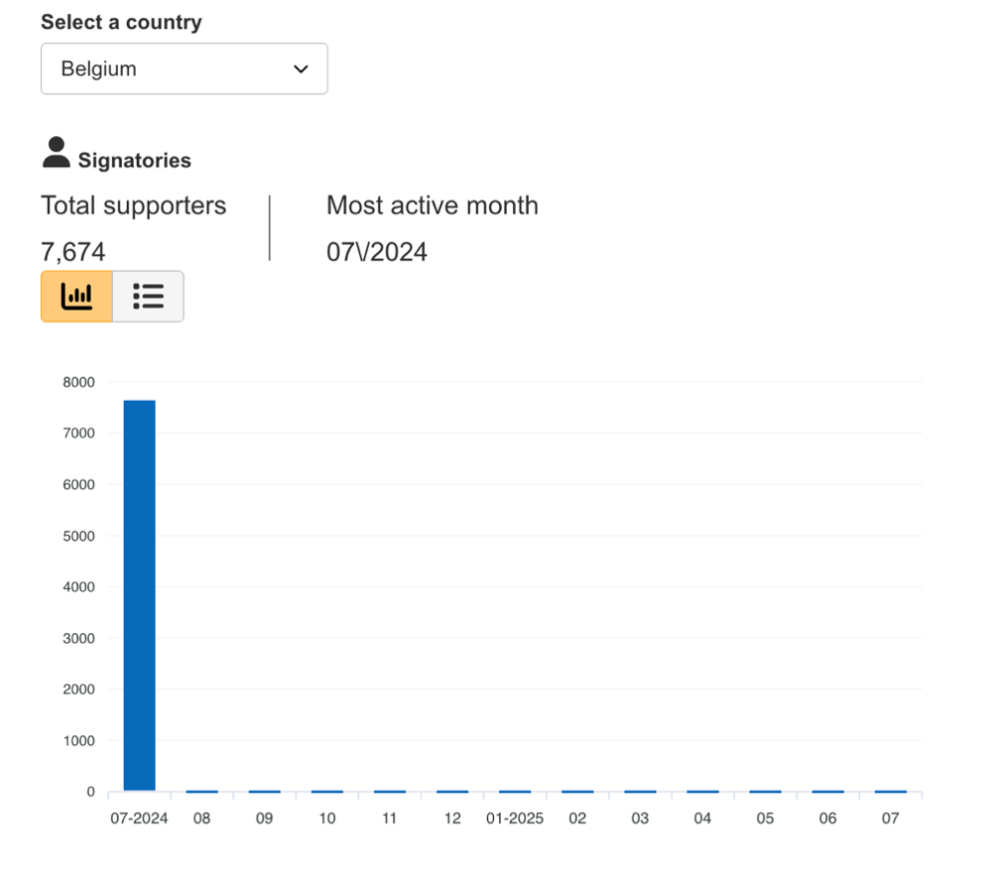
- Monthly online collection status: signatures collected EU wide per month

- Signatures collected per country per month (available in graph and table format)
Customise
To upload your initiative logo and the link to the website of your initiative, select the Customise section.
The recommended dimensions for the logo image is 3:1.
Make it social
Go to the Make it social section to add your social media links to your online collection page. You have the option to customise the message displayed to encourage supporters to share their support on social media, for example, ‘Share with friends’.
Inform supporters
When signing an initiative, the citizen has the option to subscribe to updates about your European Citizens’ Initiative by providing their email address. If the citizen subscribes to updates about the initiative and enters their email, you can contact them via their ECI organiser account in the Inform supporters section, located under the Manage online collection menu tab on the left side of the Organiser account.
For privacy reasons, you, as an ECI organiser, do not have access to the actual email addresses of the signatories.

The online collection system records the language the citizen selected to visit the site and sign the initiative. This allows you to know which language the citizen prefers for mailings.
Redirecting to your initiative’s collection page from your campaign site
From your own initiative campaign site, you can redirect to your initiative’s page in the Central Online Collection System. See the User manual for specific instructions.
End of Signature Collection period
On the end date of your initiative collection period, the system will automatically close signature collection at 24:00 CET.
The home page of your collection system will display the information that the signature collection has closed. Citizens will not be able to sign the initiative, but they will still be able to consult the general information (objectives etc.) and the number of signatures collected online.
Need additional support?
Have additional questions about the online collection system? Please consult the User manual (available to organisers of registered ECIs) or contact the ECI Forum via the Ask the expert tool.
The opinions expressed on the ECI Forum reflect solely the point of view of their authors and can in no way be taken to reflect the position of the European Commission or of the European Union.